Free plugin coming soon for Pro Tools · macOS
In development
Your whole AudioSuite chain. One pass.
A VST3 and AU plugin rack for Pro Tools, built to save you time: preview and render your whole plugin chain in a single AudioSuite render, instead of one plugin at a time.

Save time
In AudioSuite, each plugin is previewed and rendered one at a time. For a cleaning chain of several plugins, you repeat preview and render at every step, on every clip, and you only hear the complete chain once everything is rendered. RackAudioSuite puts the whole chain in one window: you hear the complete result in preview, tune it, then render everything in a single render. Fewer round trips, fewer intermediate renders, and chain presets to recall the same settings from one clip to the next.
What it does
- A chain of VST3 and AU plugins. Each plugin opens its interface in a pop-up window that stays in front.
- Preview and render the whole chain in one AudioSuite pass, sample-aligned, even with very high-latency plugins. Preview loops without gaps. Also works as an insert.
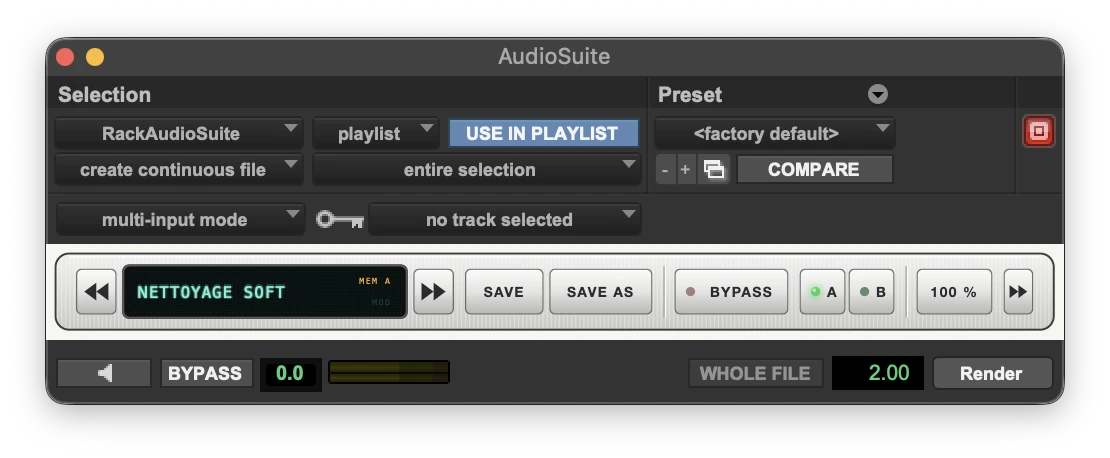
- A compact bar: the preset, A/B, bypass, plugin names and a status LED per plugin. The bar collapses to the essentials, and the AudioSuite window stays open.
- Chain presets, A/B of the whole chain, per-plugin or global bypass, with latency compensation.
- Key input (sidechain) can be enabled plugin by plugin, delayed by the latency of the plugins before it so it stays aligned.
- Works with PhaseAlign: placed last in the chain, it realigns the result of all the plugins before it, in a single render (see “Together”).
- A plugin missing on another machine keeps its slot and settings.
- Listed under AudioSuite > Sound Field. AAX, VST3, AU and standalone app. Apple Silicon and Intel.
Limit: The rack cannot load AAX plugins: a plugin sold only as AAX cannot be added to the chain. macOS only.
Together: clean, chain, realign
RackAudioSuite (the rack that chains your cleaning plugins into a single AudioSuite render) and PhaseAlign (time and phase alignment between two mics) are designed to work together. In a cleaning chain (denoise, de-click, EQ…), every plugin adds its own latency and small phase shifts. Placed last in RackAudioSuite, PhaseAlign realigns the output of the whole chain to the reference track (the key input), from the very first sample, in a single render. You clean an HF mic and get it back locked to the boom, with no second tool and no second render.
What happens on render
- On Render, RackAudioSuite reads the whole region and runs it once through the plugins placed before PhaseAlign. The result is kept in memory.
- PhaseAlign analyses this cleaned result against the reference, over the whole clip.
- The render replays the stored result (the cleaning plugins do not run twice) and PhaseAlign realigns it from the first sample. The latency and phase shifts added by the chain are caught up.
- In Preview, PhaseAlign is transparent and has no latency: you tune your cleaning chain without waiting. If RackAudioSuite or PhaseAlign is bypassed, nothing is realigned.
Practical points
- Put PhaseAlign last in RackAudioSuite.
- Use the VST3 version of PhaseAlign in RackAudioSuite (not the AU).
- Choose the reference in the Key Input menu of RackAudioSuite's AudioSuite window.
- The render takes a little longer than with RackAudioSuite alone: the clip is analysed before rendering, roughly a fifth of the clip's duration depending on the plugins in the chain.
Download
Free, no sign-up. No iLok key needed.
The plugin is still in development: the download is not open yet.
Questions
Why no AAX plugins in the rack?
Only Avid's software can load AAX plugins. The rack uses the VST3 or AU versions of your plugins, which most developers install alongside AAX.
A plugin doesn't show up in the list?
The rack only lists VST3 and AU plugins. On an Apple Silicon Mac, an Intel-only plugin cannot load. The scan runs separately: a plugin that crashes during the scan is set aside without closing the rack. Update it, then run the scan again.
Do Preview and Render stay visible?
Yes. Pro Tools draws these buttons and the AudioSuite options around the plugin itself. The rack only takes the middle bar.
And PhaseAlign?
PhaseAlign is a second tool, designed to work with the rack. Placed last in the chain, it realigns the result of all the plugins before it to a reference track, in a single render. See the “Together” section and the PhaseAlign page.
Do I need an iLok key?
No. No iLok key is needed to use the plugin.
Where are the files installed?
In the standard macOS folders (/Library/Audio/Plug-Ins and /Library/Application Support/Avid/Audio/Plug-Ins). Presets live in ~/Music/RackAudioSuite/Presets. To uninstall, delete the RackAudioSuite files from these folders.